Below is code to convert from java.io.InputStream into a String in just two line of Java 5 code.
public static String convertToString(InputStream in) {
java.util.Scanner s = new java.util.Scanner(in).useDelimiter("\\A");
return s.hasNext() ? s.next() : "";
}
Idea taken from "Stupid Scanner tricks"

2013-05-25
DDD: Application File Structure

I am a fan of Domain Driven Design. The following is how I structure Java applications to support DDD concepts. Domain Layer
The domain layer is core of DDD. It contains the business objects state, behavior, and interaction. The domain object source code is contained in the the base.package.domain package, e.g. com.jirawat.myappname.domain package.
- Aggregate
The aggregate is a collection of associated objects that are bounded together to represent one consistent concept in a domain.
From a programming perspective, aggregates represent one consistent unit for data change, enforcing data integrity and invariants. For example, the concept of a customer can be represented by a customer aggregate. The aggregate is modeled in the source code with packages. The customer aggregate is modeled in the package com.jirawat.myappname.domain.model.customer. - Aggregate Root
The aggregate root is the only external access point into the aggregate. Data access and changes to the other classes in the aggregate goes through the aggregate root. This allows the aggregate root to validate data integrity.
For example, the customer aggregate contains the Customer, Address, and ContactInfo classes. To access the classes in the customer aggregate, external clients will only reference the Customer object, which is the aggregate root. To change the address of a customer, the external client uses the customer.changeAddress method. To enforce the business rule that a customer must have one and only one address, the customer.changeAddress method throws an IllegalArgumentException if a null Address is passed as a parameter. The aggregate root is documented in the package-info.java Javadoc.
If an class is an aggregate root, it is further documented in that class Javadoc. To programmatically enforce that external access is limited only to the aggregate root, the constructors of the classes that are not an aggregate root can be set to package-private. To ensure that external clients do not accidentally modify references to non-aggregate root objects, an immutable or defensive copy should be returned (Item 39: Effective Java).
- Entity
An entity has one unchanging, unique identity throughout the lifecycle of the object. Equivalently, two entities are equal if the identity is the same, even though the other attributes may be different.
A customer with an ID of 101 is the same customer even though the customer's last name may have changed at some point in the object lifecycle. All entities implement the Entity interface. The code for the Entity interface is shown below.public interface Entity<T,ID> { /** * All entities must have an identity * @since 1.0 * * @return The identity of the entity */ ID identity(); /** * Entities compare by identity, not by attributes. * @since 1.0 * * @param otherEntity The other entity to be compared for equality. * @return {@code true} if the identities are the same, * even though the other entity attributes are different. */ boolean equalIdentityAs(T otherEntity); /** * Per Item 9: Effective Java, this method is to remind developers that * hashCode should be consistent * with equals. Since entity equality is defined by the identity only, * the hashCode should be generated * from the identity only also. * @since 1.0 * * @return The hashCode derived from the entity identity */ int hashCodeFromIdentity(); } - Value Object
A value object does not have an identity. It is defined by the values of its attributes. Equivalently, two value objects are equal if all the attributes are the same.
Two address objects both with the value of "123 Main St, Anywhere, MA 01730" are considered equal. This is important when comparing to see if two different customers have the same address. From an internal implementation perspective, these two addresses may be different rows in a relational database with different primary keys. But from a business perspective, these two value objects are equal since the address attributes are equal. All value objects implement the ValueObject interface. The code for the ValueObject interface is shown below.public interface ValueObject<T> { /** * Value Objects compare by attributes, not by identity. * @since 1.0 * * @param otherValueObject The other value object to be compared * for equality. * @return {@code true} if the attributes of both value objects * are the same. */ boolean equalValueAs(T otherValueObject); /** * Per Item 9: Effective Java, this method is to remind developers * that hashCode should be consistent * with equals. Since value object equality is defined by values of * its attributes, * the hashCode should be generated from the attribute values also. * @since 1.0 * * @return The hashCode derived from the attribute values */ int hashCodeFromValue(); /** * This is to emphasize to the developer that when an aggregate root * passes a reference of a internal Value Object, it should either * be a defensive copy (Item 39: Effective Java) * or, even better, an immutable object (Item 15: Effective Java) * <p /> * This prevents accidental modification of an aggregate root * invariant by accessing the Value Object reference * @since 1.0 * @return A safe copy of the Value Object */ T copy(); - Factory
A factory is a class specifically designed to create other new objects.
For example, the class CustomerFactory can be used to create new Customer objects. This can make sense from a code standpoint especially if customer creation is complex. To create a customer, business logic may dictate that postal address validation may required. It makes more sense to have the address validation proxy stubs in a CustomerFactory class instead of in the Customer object, since address validation only used during customer creation. From an object-oriented responsibility standpoint, since customer creation requires the construction of Address and ContactInfo objects, it is proper to create a new class to coordinate the creation of all three classes for the Customer aggregate root. Additional benefits/drawbacks of factories can be found in Item 1: Effective Java.
All factories implement the Factory interface. The Factory interface is just a marker interface (Item 37: Effective Java) with no method declarations. Because there are so many ways to create objects depending on the application specific business rules, it does not make sense to define a generic object creation method. The main benefit of using the Factory marker interface is that in an IDE, I can list all the implementing classes of Factory to see all the factories in a project.
Factory classes will live in the same aggregate package as the class it creates. CustomerFactory lives in the package com.jirawat.myappname.domain.model.customer. It is annoying to expand multiple directories or different modules when attempting to understand a context. As a new developer reading foreign code for the first time, when I need to understand the customer context, I just want to look at the com.jirawat.myappname.domain.model.customer package directory and see all the entities, value object, factories, and repositories responsible for the customer bound in one place.
Like any good thing, do not overuse factories. If the object creation logic is simple and does not reference a lot of other Entities or Value Objects, then just create a normal constructor on the class.
- Repository
A repository is responsible for saving and retrieving objects from the data store. The common JEE term for repository is DAO (Data Access Object).
In a majority of applications, a repository is saving the state of a object via INSERT/UPDATE/DELETE and SELECT on a SQL database. All repositories implement the Repository interface. Like Factory, the Repository interface is usually a marker interface. The reason the Respository interface does not have generic methods like find(), findAll(), and store() is because some object repository may be read-only (no store method) or sometimes even write-only like logging events to a database table. I am not a big fan of using UnsupportedOperationException as I consider that a sign of a poorly planned interface.
Lately with rise of Command Query Responsibility Segregation, I have been experimenting with using the interfaces CommandRepository, QueryRepository, and Repository, as shown in the code below.public interface CommandRespository<T> { /** * Save Object of Type T into the data store * * @param storeObject Object of Type T to save into data store */ void store(T storeObject); } public interface QueryRespository<T> { /** * Find Type T from the data store using Key K * * @param key * @return Object of Type T if found, else {@code null} */ T find(K key); } public interface Repository<T> extends CommandRespository<T>, QueryRespository<T> { }Like Factory, the Repository will live in the same aggregate package as the class it is responsible for. The CustomerRepository lives in the com.jirawat.myappname.domain.model.customer package. The CustomerRepository is an interface that extends Repository interface. The actual Repository implementation will live in the persistence infrastructure package, com.jirawat.myappname.infrastructure.persistence. This allows us to swap repository implementation depending on the situation.
For example, in production we can use Hibernate connected to a relational database by placing the implementation in com.jirawat.myappname.infrastructure.persistence.hibernate. In unit testing, we can swap out the hibernate implementation with an in-memory model using the com.jirawat.myappname.infrastructure.persistence.inmem package. By having the client use the CustomerRepository interface, we do not have to modify the client code when we swap datastore implementations. - Service
A domain service is a stateless class that coordinates business logic between different aggregates in the domain. Operations are put in a domain service when it is not an appropriate responsibility for any one entity or value object. Domain services should only use other domain entities and value objects. If the services uses any other layers like infrastructure, it probably belongs as an application service.
Services are often abused in JEE development.Methods that should logically reside in the Entity or Value Object are placed in the service layer. As an example, the calcuateTotalPrice method is erroneously placed in the OrderService object instead of correctly residing in the Order entity itself.
Another form of abuse is wrapping access to the repository (DAO) without any functional additions. A contrete sample of this is a CustomerService.findCustomer method that
delegates to the CustomerDAO.findCustomer method, without any further logic. The delegation serves no purpose and leads to extraneous, useless code. It is perfectly acceptable
to invoke CustomerDAO.findCustomer directly.
All domain services are grouped under one service package, e.g. com.jirawat.myappname.service. - Domain Event
An domain event is an unique situation that is important to the domain.
Events are common when using an asynchronous messaging system. When an order is delivered to the customer, the delivery system can send an OrderDeliveredEvent.
Events implement the DomainEvent interface. The code for the DomainEvent interface is shown below
public interface DomainEvent<T> {

  /**
   * Compare if two domain events are the same.
   * Depending on the event implementation, there may be an event ID to compare
   * or the comparision may happen by the event attributes like timestamp.
   * @since 1.0
   *
   * @param other The other domain event.
   * @return {@code true} if the other event and this event are the same
   */
  boolean equalEventAs(T otherEvent);
}
Infrastructure Layer
The infrastructure layer is where you integrate with the third party frameworks such as Hibernate and Spring.
Persistence is the most common functionality in the infrastructure layer. All persistence code is located in the infrastructure persistence package. For Hibernate, the persistence package would be com.jirawat.myappname.infrastructure.persistence.hibernate .
Application Layer
The application layer is a thin layer to coordinate the usage of domain objects.
The application layer does not have any business logic and it should not hold any domain state. The application layer is where you would implement transactions.
The package name of the application layer is com.jirawat.myappname.application.
User Interface Layer
The User Interfaces layer is code to support the input/output commands for the application.
Generally the UI will be a HTML web application for the browser but that does not have to be the only type of user interface. Web services, JMS, and rich client are also included in the user interfaces layers.
The base package for the user interfaces layer is com.jirawat.myappname.interfaces . Then each section will have its own package. A customer web UI interface is in the package com.jirawat.myappname.interfaces.customer.web while an ordering web service is in the com.jirawat.myappname.interfaces.order.ws package.
2013-03-13
xmllint: Format and Validate XML on Unix
xmllint can be used in Unix to format and validate XML.
- How do I pretty format XML?
xmllint --output newFile.xml --format oldFile.xml - How do I use tabs instead of spaces to format XML?
XMLLINT_INDENT=$'\t' xmllint --output newFile.xml --format oldFile.xml - How do I validate an XML against a DTD?
xmllint --dtdvalid http://java.sun.com/j2ee/dtds/web-app_2_2.dtd web.xml - How do I validate against a XSD schema?
xmllint --debugent --schema http://java.sun.com/xml/ns/j2ee/web-app_2_4.xsd web.xml
2013-03-12
Android ListView Tutorial: simple_list_item_2 and SimpleAdapter
This tutorial demonstrates how to display an array of Java enum in the Android UI. This example is also applicable if using an array or List of JavaBeans or plain Java Objects.
Core Concepts Covered
1. Create class extending android.app.ListActivity.
For this tutorial, we will use an enum containing the 13 US original colonies. View the full UsState.java code listing.
private String stateName;
}
Each element in the List will correspond to a row in the Android UI list. The Map<String, String> maps the attributes on the Object to the android.R.id.text1 and android.R.id.text2 UI fields.
For example, if you input
4. Create an android.widget.SimpleAdapter in the ListActivity class from step 1 that connects the List<Map<String, String>> data to android.R.layout.simple_list_item_2.
View the full MainActivity.java code listing.
The final result will look like this

Source Code: Git | SVN | Download Zip
Core Concepts Covered
- Use the built-in android.R.layout.simple_list_item_2 to create an Android UI List.
- Use android.widget.SimpleAdapter to display an array of Java enum in the Android UI List.
- Create class extending android.app.ListActivity.
- Obtain data as an array of Java enum entries.
- Convert the array of enum into a List<Map<String, String>> format that will be used by the android.widget.SimpleAdapter constructor.
- Create an android.widget.SimpleAdapter that connects the List<Map<String, String>> data to android.R.layout.simple_list_item_2.
- Bind the android.widget.ListAdapter using the ListActivity.setListAdapter method.
1. Create class extending android.app.ListActivity.
public class MainActivity extends ListActivity {
@Override
protected final void onCreate(final Bundle savedInstanceState) {
super.onCreate(savedInstanceState);
}
}
For this tutorial, we will use an enum containing the 13 US original colonies. View the full UsState.java code listing.
public enum UsState {
DE("Delaware"),
PA("Pennsylvania"),
NJ("New Jersey");
private UsState(final String name) {
this.stateName = name;
}
public String getStateName() {
return this.stateName;
}
public String getAbbreviation() {
return this.name();
}
}
3. Convert the array of enum into a List<Map<String, String>> format that will be used by the android.widget.SimpleAdapter constructor.
private static final String TEXT1 = "text1";
private static final String TEXT2 = "text2";
private static final String TEXT2 = "text2";
private List<Map<String, String>> convertToListItems(final UsState[] states) {
final List<Map<String, String>> listItem =
new ArrayList<Map<String, String>>(states.length);
for (final UsState state: states) {
final Map<String, String> listItemMap = new HashMap<String, String>();
listItemMap.put(TEXT1, state.getStateName());
listItemMap.put(TEXT2, state.getAbbreviation());
listItem.add(Collections.unmodifiableMap(listItemMap));
}
return Collections.unmodifiableList(listItem);
}
The convertToListItems method converts an array of UsState into a List of Map. The List of Map will be used as part of the constructor for a SimpleAdapter.
For example, if you input
UsState[] =
[ DE("Delaware"),
PA("Pennsylvania"),
NJ("New Jersey")
];
the output will be
List<Map<String, String>> =
[ {text1="Delaware", text2="DE"},
{text1="Pennsylvania", text2="PA"},
{text1="New Jersey", text2="NJ"}
];
private ListAdapter createListAdapter(final UsState[] states) {
final String[] fromMapKey = new String[] {TEXT1, TEXT2};
final int[] toLayoutId = new int[] {android.R.id.text1, android.R.id.text2};
final List<Map<String, String>> list = convertToListItems(states);
return new SimpleAdapter(this, list,
android.R.layout.simple_list_item_2,
fromMapKey, toLayoutId);
}
In the createListAdapter method, the constructor of the SimpleAdapter binds the keys from the Map<String, String> created in convertToListItems to the android.R.id.text1 and text2. It associates "text1" from the fromMapKey array to the android.R.id.text1 in the toLayoutId array. When the ListView needs to show text for the android.R.id.text1 ID, it executes a Map.get("text1") to get the String value to display, e.g. Delaware.
5. Bind the android.widget.ListAdapter using the ListActivity.setListAdapter method.
public class MainActivity extends ListActivity {
@Override
protected final void onCreate(final Bundle savedInstanceState) {
super.onCreate(savedInstanceState);
final UsState[] states = UsState.values();
final UsState[] states = UsState.values();
final ListAdapter listAdapter = createListAdapter(states);
setListAdapter(listAdapter);
}
}
The final result will look like this

Source Code: Git | SVN | Download Zip
Android ListView Tutorial: simple_list_item_1
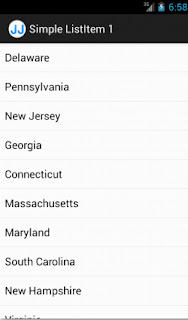
This tutorial demonstrates how to display a Java List of Strings in the Android UI. This example is also applicable if using an array of Strings.
Core Concepts Covered
1. Create class extending android.app.ListActivity.
For this tutorial, we will use a List of Strings containing the 13 US original colonies. View the full UsState.java code listing.
3. Create an android.widget.ArrayAdapter in the ListActivity class from step 1 that connects the List of Strings data to android.R.layout.simple_list_item_1.
View the full MainActivity.java code listing.
The final result will look like this
Source Code: Git | SVN | Download Zip
Core Concepts Covered
- Use the built-in android.R.layout.simple_list_item_1 to create an Android UI List.
- Use android.widget.ArrayAdapter to display a List of Strings data in the Android UI List.
- Create class extending android.app.ListActivity.
- Obtain data in List of Strings data structure.
- Create an android.widget.ArrayAdapter that connects the List of Strings data to android.R.layout.simple_list_item_1.
- Bind the android.widget.ListAdapter using the ListActivity.setListAdapter method.
1. Create class extending android.app.ListActivity.
public class MainActivity extends ListActivity {
@Override
protected final void onCreate(final Bundle savedInstanceState) {
super.onCreate(savedInstanceState);
}
}
For this tutorial, we will use a List of Strings containing the 13 US original colonies. View the full UsState.java code listing.
public final class UsState {
public static final List<String> ORIGINAL_COLONIES = initColonies();
private UsState() { }
private static List<String> initColonies() {
final List<String> colonies = new ArrayList<String>();
colonies.add("Delaware");
colonies.add("Pennsylvania");
colonies.add("New Jersey");
return Collections.unmodifiableList(colonies);
}
}
private ListAdapter createListAdapter(final List<String> list) {
return new ArrayAdapter<String>(this, android.R.layout.simple_list_item_1, list);
}
4. Bind the android.widget.ListAdapter using the ListActivity.setListAdapter method.
public class MainActivity extends ListActivity {
@Override
protected final void onCreate(final Bundle savedInstanceState) {
super.onCreate(savedInstanceState);
final ListAdapter listAdapter = createListAdapter(UsState.ORIGINAL_COLONIES);
setListAdapter(listAdapter);
}
}
The final result will look like this

Source Code: Git | SVN | Download Zip
Subscribe to:
Posts (Atom)